
ESP32 Smoke Detector v2
Watch smoke and gas levels live on a TFT as a percentage, and get a Telegram alert on your phone the moment the air crosses the line. An ESP32 + MQ-2 build for under $25.
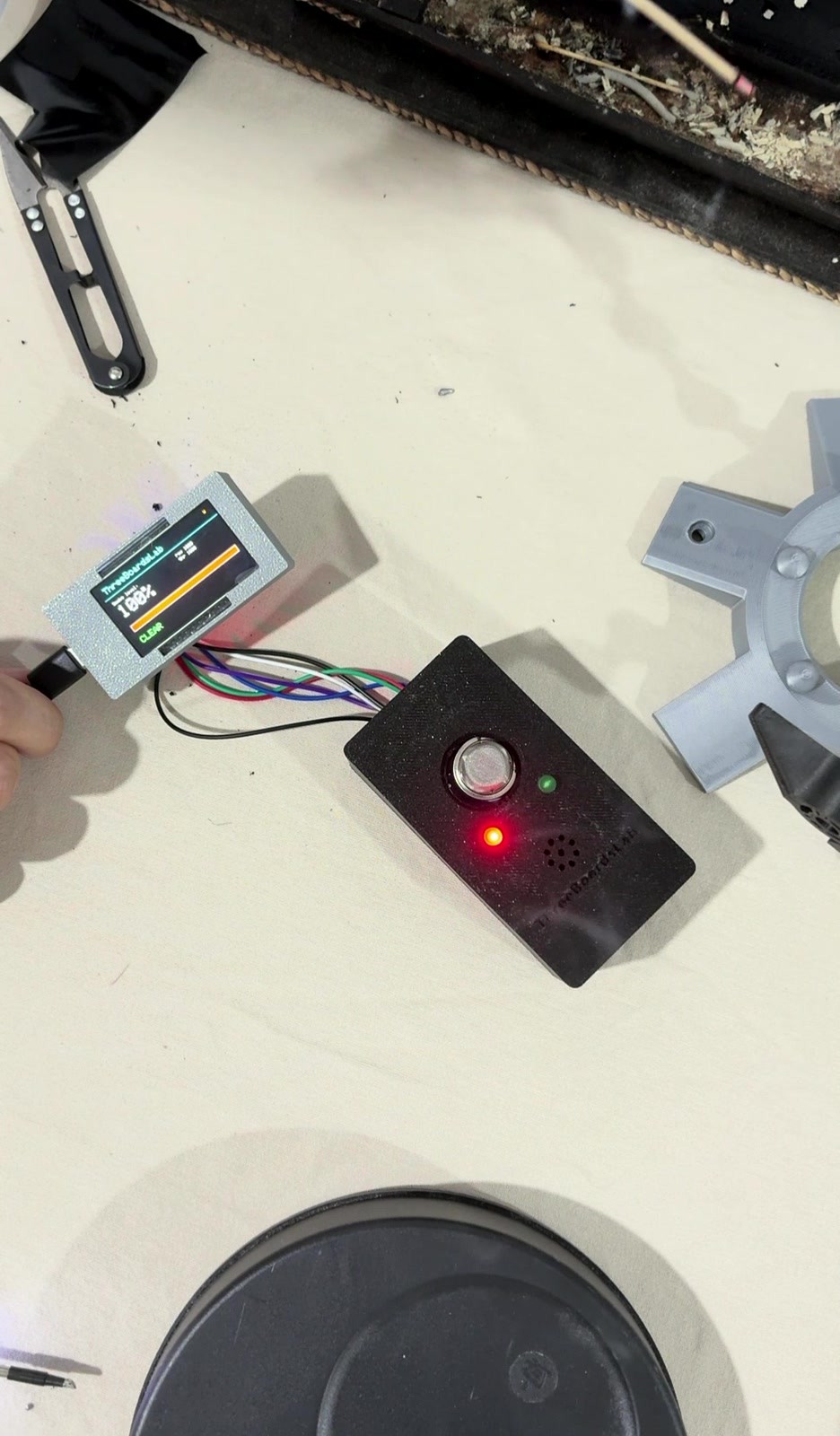
Smoke Detector v2
A DIY gas/smoke detector that shows a live smoke level and texts your phone. Low level. High impact.
What it does
Watches a room for smoke and combustible gas and shows the level live on a TFT as a percentage with a colour bar. When the level crosses the alarm point it flashes a red LED, sounds a buzzer, and sends a Telegram message to your phone — so the alert reaches you even when you’re not home. A warm-up window and a multi-reading debounce keep it from crying wolf on startup or on a brief spike. It’s a maker project, not a certified life-safety alarm — a complement to a real smoke detector, not a replacement.
Components
| Part | Module / Spec | Notes |
|---|---|---|
| Board | ESP32 DevKit with built-in ST7789 TFT (170x320) | Lives in its own printed case, outside the main enclosure, on a cable |
| Gas sensor | MQ-2 (Flying-Fish module) | Analog combustible-gas/smoke sensor; runs on 5V, needs warm-up |
| Status LEDs | 5mm red + green | Local alarm / clear indication |
| Buzzer | Active buzzer | Driven straight from a GPIO |
| Divider resistors | 1k + 2k | Level-shift the sensor output into ADC range |
| LED resistors | 220-330 ohm x2 | Current-limiting for the two LEDs |
Wiring
| Signal | ESP32 pin | To |
|---|---|---|
| Smoke level (analog) | GPIO34 | MQ-2 AO, through the 1k/2k divider |
| Red LED | GPIO13 | LED anode via 220-330 ohm -> GND |
| Green LED | GPIO14 | LED anode via 220-330 ohm -> GND |
| Buzzer | GPIO12 | Active buzzer (+) -> GND |
| Display | built-in | ST7789 on the board’s own SPI pins |
Powered over USB (5V). The MQ-2 runs on 5V and its analog output can swing above 3.3V, so a 1k/2k divider drops it into the ESP32’s safe range before GPIO34 (an input-only ADC1 pin — which also keeps it usable while WiFi is active). All grounds are common.
Rebuild gotcha: Skip the divider and GPIO34 sees ~5V and clamps near full-scale — it reads stuck-high, not “smoke.” And GPIO12 is a strapping pin; if a board ever won’t boot, move the buzzer to GPIO27.
Firmware
- Toolchain: Arduino IDE, Arduino-ESP32 core 3.3.10
- Libraries: WiFi, WiFiClientSecure, HTTPClient (Telegram over HTTPS); Adafruit GFX + Adafruit ST7789 (display)
- Reads the MQ-2 and maps it to a 0-100% smoke level: a calibrated clean-air baseline is 0%, the alarm threshold is 100%.
- On power-up it runs a ~3-minute warm-up where no alarms fire — the MQ-2 heater needs time to settle before its readings mean anything.
- The alarm needs several consecutive readings over the threshold before it triggers (debounce), and only clears once the level drops back under ~80% (hysteresis), so it never chatters around the line.
- On alarm: red LED + buzzer on, plus a Telegram message with the level; on clear, green LED and an “all clear” message.
- Non-obvious bit: the screen redraws only the values that changed each cycle instead of clearing and repainting the whole display — that one change is what removes the flicker.
- WiFi is hardcoded; the ESP32 is 2.4GHz only.
Fill in your own WiFi and Telegram details at the top before flashing. A Telegram bot token comes from @BotFather; your chat ID comes from visiting https://api.telegram.org/bot<TOKEN>/getUpdates after messaging the bot.
#include <WiFi.h>
#include <WiFiClientSecure.h>
#include <HTTPClient.h>
#include <Adafruit_GFX.h>
#include <Adafruit_ST7789.h>

const char* WIFI_SSID = "YOUR_WIFI_NAME";
const char* WIFI_PASS = "YOUR_WIFI_PASSWORD";
const char* BOT_TOKEN = "YOUR_TELEGRAM_BOT_TOKEN";
const char* CHAT_ID   = "YOUR_TELEGRAM_CHAT_ID";

const int MQ_PIN = 34;

int SMOKE_BASELINE = 700;
int SMOKE_THRESH   = 1500;

const unsigned long WARMUP_MS     = 180000;
const int   ALARM_CONSECUTIVE     = 3;
const int   CLEAR_PERCENT         = 80;
const unsigned long READ_INTERVAL = 500;

const int LED_RED    = 13;
const int LED_GREEN  = 14;
const int BUZZER_PIN = 12;

#define LCD_CS  15
#define LCD_DC   2
#define LCD_RST  4
#define LCD_BLK 32

Adafruit_ST7789 lcd = Adafruit_ST7789(LCD_CS, LCD_DC, LCD_RST);

bool          alarmActive   = false;
int           aboveCount    = 0;
unsigned long lastRead      = 0;
unsigned long bootMillis    = 0;
unsigned long lastReconnect = 0;

int toPercent(int val) {
  int p = map(val, SMOKE_BASELINE, SMOKE_THRESH, 0, 100);
  return constrain(p, 0, 100);
}

bool isWarming() {
  return (millis() - bootMillis) < WARMUP_MS;
}

void connectWiFi() {
  WiFi.mode(WIFI_STA);
  WiFi.disconnect(true);
  delay(150);
  WiFi.begin(WIFI_SSID, WIFI_PASS);
  Serial.print("Connecting");
  int tries = 0;
  while (WiFi.status() != WL_CONNECTED && tries < 40) {
    delay(500);
    Serial.print(".");
    tries++;
  }
  if (WiFi.status() == WL_CONNECTED)
    Serial.println("\nConnected: " + WiFi.localIP().toString());
  else
    Serial.println("\nWiFi failed (running offline)");
}

void sendTelegram(String msg) {
  if (WiFi.status() != WL_CONNECTED) return;
  WiFiClientSecure client;
  client.setInsecure();
  HTTPClient http;
  http.setTimeout(8000);
  http.begin(client, "https://api.telegram.org/bot" + String(BOT_TOKEN) + "/sendMessage");
  http.addHeader("Content-Type", "application/json");
  String payload = "{\"chat_id\":\"" + String(CHAT_ID) + "\",\"text\":\"" + msg + "\"}";
  int code = http.POST(payload);
  Serial.println("Telegram HTTP: " + String(code));
  http.end();
}

void attentionBeeps() {
  for (int i = 0; i < 3; i++) {
    digitalWrite(BUZZER_PIN, HIGH);
    delay(300);
    digitalWrite(BUZZER_PIN, LOW);
    delay(200);
  }
}

void paintStatic(uint16_t bg) {
  lcd.fillScreen(bg);
  lcd.setTextColor(ST77XX_CYAN, bg);
  lcd.setTextSize(2);
  lcd.setCursor(10, 8);
  lcd.print("ThreeBoardsLab");
  lcd.drawLine(0, 32, 320, 32, ST77XX_CYAN);
  lcd.setTextSize(1);
  lcd.setTextColor(ST77XX_WHITE, bg);
  lcd.setCursor(10, 44);
  lcd.print("Smoke level:");
  lcd.setCursor(190, 56);
  lcd.print("thr ");
  lcd.print(SMOKE_THRESH);
  lcd.drawRect(10, 108, 300, 16, ST77XX_WHITE);
}

void drawScreen(int val, int pct, bool warming) {
  static bool firstDraw = true;
  static bool lastAlarm = false;
  static int  lastPct   = -1;
  static int  lastVal   = -1;
  static int  lastState = -1;

  uint16_t bg = alarmActive ? ST77XX_RED : ST77XX_BLACK;
  int state   = warming ? 1 : (alarmActive ? 2 : 0);

  if (firstDraw || alarmActive != lastAlarm) {
    paintStatic(bg);
    firstDraw = false;
    lastAlarm = alarmActive;
    lastPct = lastVal = lastState = -1;
  }

  if (pct != lastPct) {
    lcd.fillRect(10, 58, 175, 34, bg);
    lcd.setTextColor(ST77XX_WHITE, bg);
    lcd.setTextSize(4);
    lcd.setCursor(10, 58);
    lcd.print(pct);
    lcd.print("%");
    int barWidth = constrain(map(pct, 0, 100, 0, 298), 0, 298);
    uint16_t barColor = pct < 60 ? ST77XX_GREEN :
                        pct < 100 ? ST77XX_YELLOW : ST77XX_RED;
    lcd.fillRect(11, 109, barWidth, 14, barColor);
    lcd.fillRect(11 + barWidth, 109, 298 - barWidth, 14, bg);
    lastPct = pct;
  }

  if (val != lastVal) {
    lcd.fillRect(190, 44, 120, 8, bg);
    lcd.setTextSize(1);
    lcd.setTextColor(ST77XX_WHITE, bg);
    lcd.setCursor(190, 44);
    lcd.print("raw ");
    lcd.print(val);
    lastVal = val;
  }

  if (state != lastState) {
    lcd.fillRect(10, 140, 240, 18, bg);
    lcd.setTextSize(2);
    lcd.setCursor(10, 140);
    if (warming) {
      lcd.setTextColor(ST77XX_YELLOW, bg);
      lcd.print("WARMING UP");
    } else if (alarmActive) {
      lcd.setTextColor(ST77XX_WHITE, bg);
      lcd.print("!! SMOKE ALERT !!");
    } else {
      lcd.setTextColor(ST77XX_GREEN, bg);
      lcd.print("CLEAR");
    }
    lastState = state;
  }

  lcd.fillRect(298, 8, 14, 12, bg);
  lcd.setTextSize(1);
  lcd.setTextColor(ST77XX_ORANGE, bg);
  lcd.setCursor(298, 8);
  lcd.print(WiFi.status() == WL_CONNECTED ? "W" : "X");
}

void setup() {
  Serial.begin(115200);
  bootMillis = millis();

  pinMode(LED_RED,   OUTPUT);
  pinMode(LED_GREEN, OUTPUT);
  pinMode(BUZZER_PIN,OUTPUT);
  digitalWrite(LED_RED,   LOW);
  digitalWrite(LED_GREEN, LOW);
  digitalWrite(BUZZER_PIN,LOW);

  pinMode(LCD_BLK, OUTPUT);
  digitalWrite(LCD_BLK, HIGH);
  lcd.init(170, 320);
  lcd.setRotation(1);
  lcd.fillScreen(ST77XX_BLACK);
  lcd.setTextColor(ST77XX_CYAN);
  lcd.setTextSize(2);
  lcd.setCursor(10, 80);
  lcd.print("ThreeBoardsLab");

  connectWiFi();

  lcd.fillScreen(ST77XX_BLACK);
  lcd.setTextSize(2);
  lcd.setCursor(10, 80);
  if (WiFi.status() == WL_CONNECTED) {
    lcd.setTextColor(ST77XX_GREEN);
    lcd.print("WiFi OK");
    digitalWrite(LED_GREEN, HIGH);
  } else {
    lcd.setTextColor(ST77XX_RED);
    lcd.print("WiFi offline");
    digitalWrite(LED_RED, HIGH);
  }
  delay(1200);

  sendTelegram("Smoke Detector online (warming up).");
}

void loop() {
  if (WiFi.status() != WL_CONNECTED && millis() - lastReconnect > 10000) {
    lastReconnect = millis();
    WiFi.reconnect();
  }

  if (millis() - lastRead < READ_INTERVAL) return;
  lastRead = millis();

  int  val     = analogRead(MQ_PIN);
  int  pct     = toPercent(val);
  bool warming = isWarming();

  Serial.printf("MQ raw:%d  %d%%  %s\n", val, pct, warming ? "(warming)" : "");

  if (!warming) {
    if (!alarmActive) {
      if (val >= SMOKE_THRESH) {
        aboveCount++;
        if (aboveCount >= ALARM_CONSECUTIVE) {
          alarmActive = true;
          aboveCount  = 0;
          digitalWrite(LED_GREEN, LOW);
          digitalWrite(LED_RED,   HIGH);
          attentionBeeps();
          digitalWrite(BUZZER_PIN, HIGH);
          sendTelegram("SMOKE DETECTED! Level: " + String(pct) + "% (raw " + String(val) + ")");
        }
      } else {
        aboveCount = 0;
      }
    } else {
      if (pct <= CLEAR_PERCENT) {
        alarmActive = false;
        digitalWrite(BUZZER_PIN, LOW);
        digitalWrite(LED_RED,    LOW);
        digitalWrite(LED_GREEN,  HIGH);
        sendTelegram("All clear. Level: " + String(pct) + "%");
      } else {
        digitalWrite(BUZZER_PIN, HIGH);
      }
    }
  }

  drawScreen(val, pct, warming);
}
Enclosure
- Printer: Bambu Lab P2S
- Filament: PLA
- Logo: embossed ThreeBoardsLab mark on a discreet spot (icon + wordmark, scaled to fit)
- The wiring lives inside; the MQ-2, both LEDs, and the buzzer sit exposed on the face so the sensor gets airflow and the indicators stay visible.
- The ESP32 and its TFT live in a separate printed case outside this box, joined by a cable — keeps the screen where you can see it and the main enclosure clean.
- Wall-mountable and designed to print in multiples with a finished look rather than a prototype feel.